But Why!?
Breakdance has a lot of animations built in… but not everything can be animated… until now. Scroll Morpher is for those rare or special moments when you want to animate a property that isn’t available in Breakdance.
Previously you could set dozens of things, we had many dialogues, buttons and fields – too many. This also made the script a bit complicated. Now I’ve completely changed it to a single repeater. It means you can add any number of transforms and CSS properties, sync them, trigger at different points and all the wonders. The script is also down to about 70 lines.
Adding Animations
Add an animation with the Add Item button. Each animation will apply to the Scroll Morpher container itself by default.
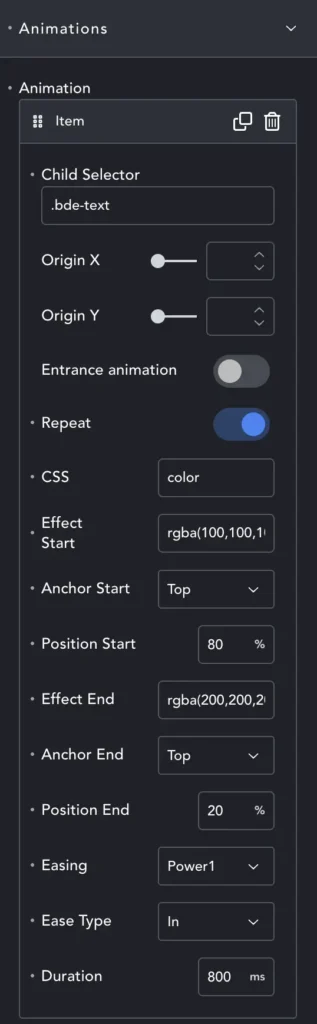
Child Selector – allows you to specify what should animate. Breakdance doesn’t use <p> tags (very naughty) so we have to target text in a simple text element with the .bde-text class.
Therefore if you want to change the text color, add .bde-text in th child selector. Alternatively, add h4, or .section – or whatever you want to target. But the target must be INSIDE Scroll Morpher or it won’t be found.
Origin X/Y – If we leave these blank, SM will treat this as a CSS animation. If we want to use transforms (like rotate or translateX) we need to set the origin.
Entrance Animation – If enabled, this is a ‘trigger and complete’ entrance animation. If disabled, this is a ‘tied to scroll’ animation.
Repeat – Enabled and we trigger each time the element hits the Position Start for ‘Entrance Anims’, or through every scroll for ‘Scroll-tied’. Disabled and we trigger only once.
CSS – enter the property you wish to animate (e.g. color, rotateY, skew etc.). This needs to be in GSAP format, which is camelCase. If a property is background-color, we enter backgroundColor, z-index becomes zIndex and so on.
Effect Start – The value at the beginning of the animation. If we want to grow our font size we might do this:-
CSS: fontSize, Effect Start: 1rem, Effect End: 3rem. Our font will now grow from 1 to 3 rem.
Use the correct format. If you want to animate color, effect start is rgba(1,2,3,.4). For rotation, use 30deg, scale uses either 100%, or just 1, down to 50% or .5.
Be consistent. Don’t start with #123123 and end with rgb(1,2,3) – GSAP can’t interpolate when the units vary like this. Don’t try and animate from 1px to 3rem. In some cases GSAP will cope, but in others it will not. To be certain, use the same unit for start and end.
Anchor Start – should we measure when the Top of our element hits the trigger, or the Bottom of the element?
Position Start – this is the trigger point, as a % from the top of the screen.
If we want to start animating when the bottom of our element comes into view, we can set:
Anchor Start: Bottom, Position Start: 100%
Effect End – This is the state, or CSS value, we want for our animation end, our ‘to’ value.
Anchor/Position End – As with the start, but this marks where we reach our final CSS end state. These only matter for scroll-tied animations. Entrance animations will use the duration instead.
Easing/Type – We can choose the easing and type for Entrance Animations here.
Duration – For Entrance this decides the speed of the Entrance Animation. If we are Scroll-Tied (Entrance Animation is OFF) this will provide a little ‘lag’ to smooth the animation. Set it to zero or empty to remove this lag.
Styles
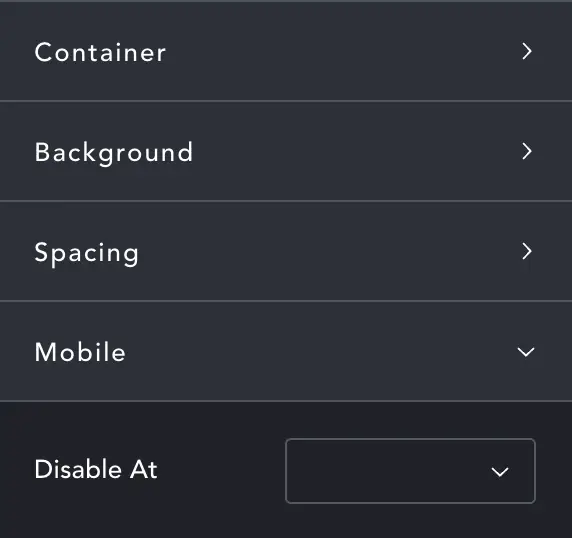
Scroll Morpher is a Div and has many of the style options of the Breakdance default Div element.
The only extra option is Mobile-> Disable At, where you can decide at what breakpoint we stop showing our animations.