Basic Setup
Simple Docs will turn any post-type into this: https://breakdance.com/documentation/
It works with any post or custom post type. Create your posts and a set of categories, with parent and child categories if you need. Once you have the posts we’re ready to setup Simple Docs.
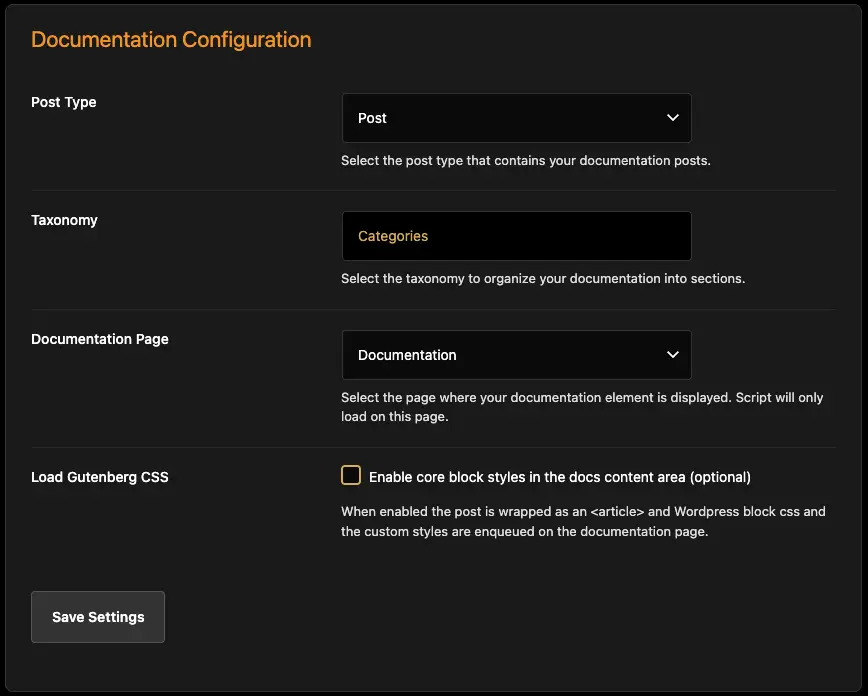
Select Your Post Type
On the main Settings page you can select the post type, the taxonomy and the document page.
If you want to preview the page fully in Breakdance, make sure you have set the page before editing it in Breakdance (so it will load scripts).
Load Gutenberg CSS will load some Block CSS on the front-end, so that basics like columns will render properly.
If you only use text, headings and images you don’t need the Gutenberg CSS. However, you can also remove the default CSS included with Simple Docs and add your own, to enable custom styles if needed. Do this in the Block Styles menu in Simple Docs.

Organise your terms
The Term Order page allows you to drag-n-drop your terms into the order you prefer front-end.
Headings work in two ways. Add text for a parent and it becomes an ‘overall heading’, a parent to all the terms below it.
If you select No Accordion the terms will always show, rather than being tucked into an accordion. In this case, you don’t see the Term Name – which may be desired in some cases.
If you do want to see the term name, you can add it in the Heading – and the term will have a heading but no accordion.
Front Page
Simple Docs includes an Element for the front-end documentation. Add that to your page.


The Content section allows you to create an intro and decide where/if you want to display a HOME button and the Search box.
You can include the search in the index pane and the front-page if you wish.

Placeholders
The messages section allows you to manage placeholders for every part of the Document.
If you need more instruction than that, you probably shouldn’t be using a computer at all.
Styling
There are loads of styling options with obvious names – to help you make the Document Library match your site. Since they work as all Breakdance Elements work we won’t go through those.

The Layout has a few unique controls.
Sticky Nav will make the index/nav sticky for long posts.
Scroll To Top will make the page scroll to the top of a post when it’s clicked.
Offset controls where the sticky sticks, from top of viewport.
Mobile Off-Canvas will create an off-canvas menu <768px. If this is disabled, the nav will be placed above the post container and become scrollable on mobile.
You can then control where the menu-trigger sits on the screen, to ensure it doesn’t overlap any other menus or triggers.
That’s pretty much it. If you have posts ready, you should be able to get a fully functional documentation page in about 10 minutes. Enjoy!