You can populate select drop-downs in any Breakdance form using the SFF: Populate Select action. Add a Select field to your form, leave it with no options, then point the action at it and choose where the options come from: Posts, Terms, an ACF Select field, or a custom hook.
Setting it up
- Add a Select field to your form and leave it with no options — the action fills them in when the field renders.
- Add the “SFF: Populate Select” action under Actions After Submission.
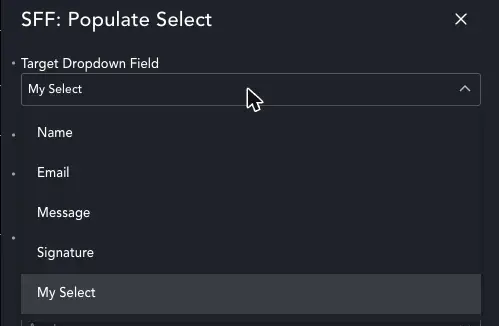
- In the action’s popup, set Target Dropdown Field to your empty Select field, then pick a Source Type: Terms, Posts, ACF, or Hook.
Terms
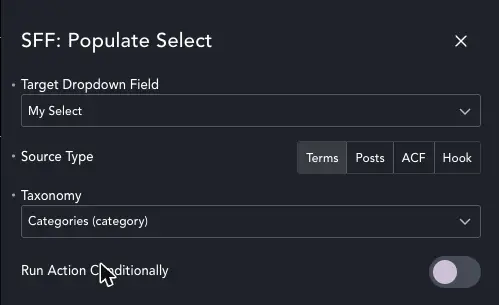
Terms returns the top-level terms only, from whichever taxonomy you choose — child terms are left out. If you need something more specific than “top level only,” use the Hook source type instead and build the list yourself.
Posts
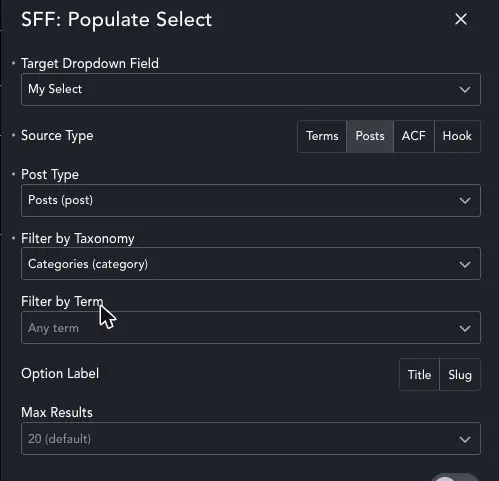
With Posts, you choose a post type and optionally narrow it down to a taxonomy and a term — leave either blank to include all of that post type. Pick whether the visible label shows the post’s title or its slug, and set a Max Results cap so a large post type doesn’t dump hundreds of options into the dropdown.
Max Results defaults to 20 (choices are 10, 20, 50 or 100), and only published posts are ever pulled in — drafts and other statuses won’t show up as options.
ACF Select
To use this option, create an ACF Select, Radio, or Checkbox field and attach it to the relevant post or page, then enter its field name — not its label — in the action’s ACF Field Name control. If your field is called my_acf_select, that’s exactly what you type in. The action reads the field’s own choices via get_field_object() and uses its value/label pairs to populate the dropdown.
Custom Hook
The Hook source type lets you populate the select with anything you can code — specific terms, data from another plugin, a remote API you’ve already fetched, whatever you like. Add the code to your theme’s functions.php or your own plugin.
In the action’s Filter Tag field, enter a name — this becomes the tag name of your custom hook, appended to smithy_select_options_. Enter my_colours and your function needs to hook smithy_select_options_my_colours, like this:
add_filter( 'smithy_select_options_my_colours', function( $opts ) {
    return [
        [ 'value' => 'red',   'text' => 'Red'   ],
        [ 'value' => 'blue',  'text' => 'Blue'  ],
        [ 'value' => 'green', 'text' => 'Green' ],
    ];
} );
However you build your options, they need to be returned in this value/text format for the field to pick them up.
Gotchas
- Target Dropdown Field lists every field on the form, not just Select fields — it isn’t filtered by type. Pick the wrong one (a Text field, a File Upload field) and nothing will visibly break, the options just never appear.
- Terms only returns top-level terms. If you need child terms, or anything more specific than “every top-level term in this taxonomy,” use the Hook source type and build the list yourself.
- ACF Select wants the field’s name, not its label — check the “Field Name” shown in the field group settings in ACF, not the label your visitors see.
- The options are injected via an inline script tag right after the field renders — there’s no AJAX call and no loading flicker, but it also means the dropdown stays empty if JavaScript is disabled or blocked on the page.
- You can add more than one “SFF: Populate Select” action to the same form — one per dropdown — as long as each points at a different Target Dropdown Field.
Common questions
Can I populate more than one dropdown on the same form?
Yes — add a separate “SFF: Populate Select” action for each dropdown, each pointing at its own Target Dropdown Field.
Why is my dropdown still showing “Select…” with no options?
Almost always it’s Target Dropdown Field pointing at the wrong field — remember the list isn’t filtered to Select fields, so it’s easy to pick a similarly-named field by mistake. After that, check the source has something to return: a taxonomy with top-level terms, a post type with published posts matching your filters, a correctly-spelled ACF field name, or a hook that’s actually registered on functions.php.
Can I add a default “Please choose…” option?
Not built into the action — it only injects the options it finds, it doesn’t touch the field’s own configuration. Breakdance’s Select field placeholder text (shown before anything is chosen) already covers this for most forms, so you may not need to add one.