Admin Editing
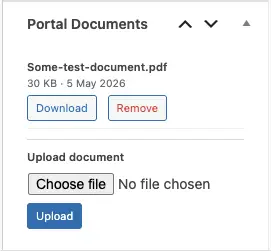
Editing posts is the same as editing any post. The difference is the extra meta-boxes which are available on the post itself.
Portal Documents – here you can remove or download a document, and upload a new one to the post.
For files removed from posts, you can manage these in the Smithy Portal Settings page.
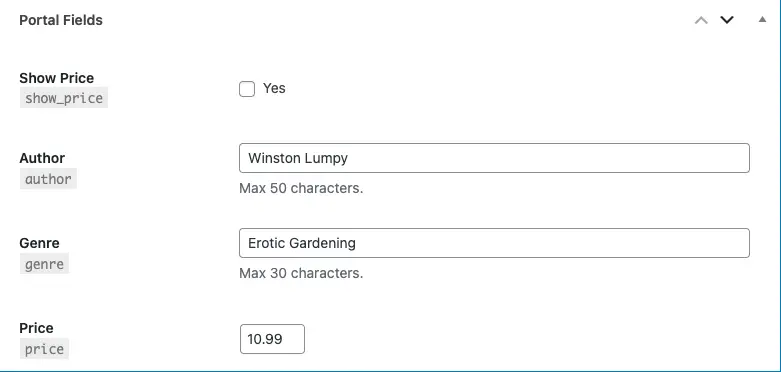
Portal Fields – at the bottom of the post will be any custom fields you create for it.
Front-End Editing
Smithy Portal includes two Form Actions you can add to any Breakdance form, Smithy Create Post and Smithy Edit Post. To enable front-end editing you wire up a form in the same way that you do for front-end posting – with one addition and a different form action.
Rather than build a page, we create a template. We’ve already documented the template basics here. To add post editing to this template we simply add a form.
Known limitation
When creating the portal the intent was to make a plugin anyone could use, without needing other plugins. However, Breakdance Forms do not currently offer any way to add a custom field type. Therefor all text fields are plain text – there is no rich text option. This means you need to build templates with small, distinct text areas. If ever the rich text field becomes possible, it will be added and more complex post-content will be possible, for now it’s plain text, images and use of dynamic data for things like button links.
For this reason it’s recommended you don’t use post content – instead, create a custom text-area field and use that for a ‘long text’ option.
Wiring Up Forms
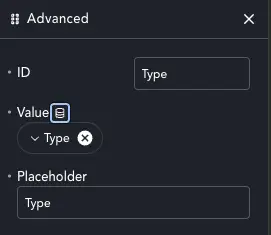
When you create custom meta with Smithy Portal, each field is available as dynamic data. You need to build your form with fields that match the data required, like post title, excerpt and any custom fields you added.
For each field, go to advanced and set the value. Use the dynamic data item to wire the fields value up to the post meta.
While we can upload further documents, we can’t manage existing downloads with a Breakdance form – so we use the Portal Document element. If we want to enable deletion of posts, add the Portal Control element to your template.
The term field for choosing a category can’t easily be wired in, so Smithy Portal manages that. Add a select field and give it an ID, but NO OPTIONS! We will wire this up in the action below.
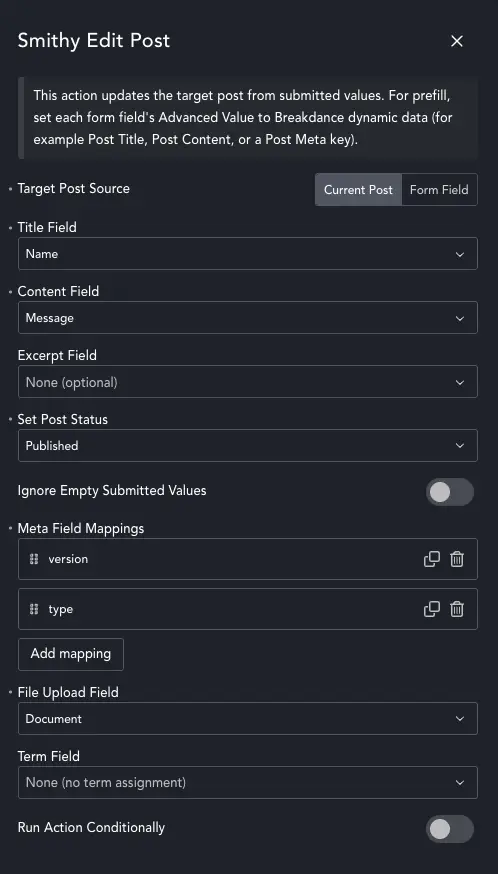
Form Action – Edit Post
The Create Post action isn’t limited to our Portal Post Type. Feel free to use it to enable front-end edits for any post type.
In rare cases maybe you only want to allow the editing of a specific post – or perhaps pull the post ID from another post field. Choosing Form Field as the Post Source allows you to do this. Create a hidden field, link it to the real post ID and use it as the source. In this case the form doesn’t have to be in a template.
In the majority of cases we’ll use Current Post.
Simply connect every field to the post fields. For the more custom meta you can use the Meta Field Mappings – and select the form field, then enter the custom field key.
Now we can wire up our taxonomy. In the Term Field choose the empty select field we added. Smithy Portal will then automatically populate the select with the top-level terms in that taxonomy.
You’re done! You now have a front-end form to edit posts with optional file uploads.