We will assume you know how to add user details and other general dynamic data. The obvious extra for Smithy Portal is to provide users with a list of their own posts, and a list of all the posts they have tagged (or have followed, wish-listed etc.) – or posts they created that others have tagged.
This is made very easy because we can simply use the Breakdance tools we are familiar with.
Post Loops for Accounts
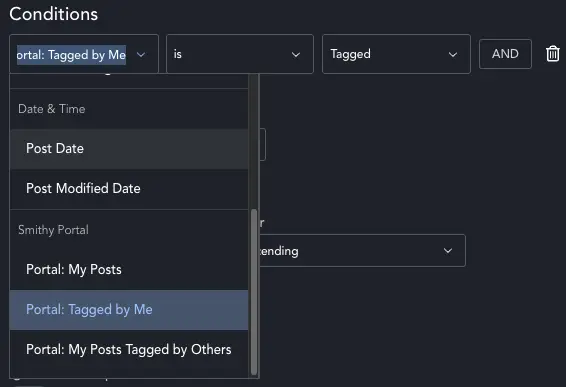
Smithy Portal adds three custom conditions for Breakdance Queries – which enable you to build the user dashboard.
Whatever post-type you built – simply set the query to fetch it, then add a condition. The dropdown now includes three extra options.
Portal: My Posts will return posts the user has created (based on ‘Author’ – so you can change who a post is assigned to by changing the author). Portal: Tagged By Me will return posts the user has tagged.
Portal: My Posts Tagged By Others allows you to add a ‘popular posts’ type feature. Any of the users posts that other people have followed will be displayed, so they can see what is getting engagement.
Building the loop
You can now use any Breakdance Loop, but the ‘Post Loop’ is the most obvious, so we’ll generally use this to make a list of posts. You do exactly what you do with any post loop – build a custom block and then set-up your query.
The only extra item is the Portal Control (see Creating Templates for details). Add this in to a global block, and you can easily build archive pages which list posts, and allow users to tag them right from the archive page. The tag button is context aware, so will tag the right post in an archive or single template.
Advanced Queries
You can use the PHP Array query type, if you need a more complex query, since it uses the existing WordPress author – just do something like this for my posts:
$uid = get_current_user_id();
if ( ! $uid ) return ['post__in' => [0]]; // force empty if not logged in
return [
    'post_type' => 'your_post_type',
    'author'    => $uid,
];
To fetch My Tagged Posts do something like this:
$uid = get_current_user_id();
if ( ! $uid ) return ['post__in' => [0]];
return [
    'post_type'  => 'your_post_type',
    'meta_query' => [[
        'key'     => '_sp_tagged_users',
        'value'   => 'i:' . $uid . ';',
        'compare' => 'LIKE',
    ]],
];
The meta is the important bit. SP saves a serialised array of users who tag a post into _sp_tagged_users post meta, and this ‘value’ checks if the current user is in that array.
To fetch My Tagged Posts use this format:
$uid = get_current_user_id();
if ( ! $uid ) return ['post__in' => [0]];
return [
    'post_type'  => 'cd_ticket',
    'author'     => $uid,
    'meta_query' => [[
        'key'     => '_sp_tagged_users',
        'compare' => 'EXISTS',
    ]],
];
Users can’t tag their own posts – so if a post of theirs has tags, those are other people who have tagged the post.