The SF Fluent plugin enables you to use FluentCart Blocks in Breakdance. Fluent has an API for it’s blocks and we tap into that – so FluentCart renders the element, we just enable a Breakdance interface. If Fluent change a block, we’ll immediately render that new block – no waiting for SF to catch up!
The blocks are self-explanatory and the controls match Gutenberg – so Fluent’s own docs will explain most things. Here we’re looking at any unique controls SF introduces.
Button Controls
There are three parts to button controls, one for labels and two for styles.
Button Labels
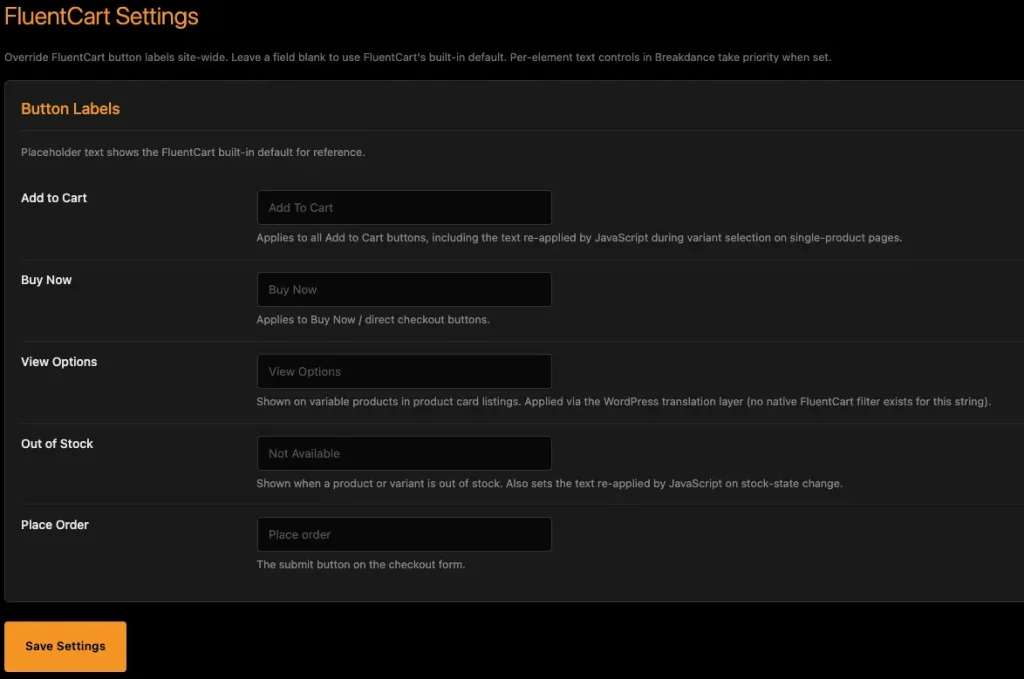
Since Fluent uses script to change buttons, we can’t always have individual element controls for them. Instead, SF-Fluent has an admin page where you can set your preferred labels site-wide.
Set the labels you want and the rest takes care of itself.
Button Styles
You can set button styles for Fluent Cart in the Global Styles panel. Fluent buttons have some hard-coded styles which are very difficult to over-ride. Therefore the global controls will only allow you to style colors, typography and borders – they can’t over-ride the subtle gradient overlay and Fluent might still use script in rare places to revert styles again.
To enable you to fully style your buttons, the better way is to use presets.
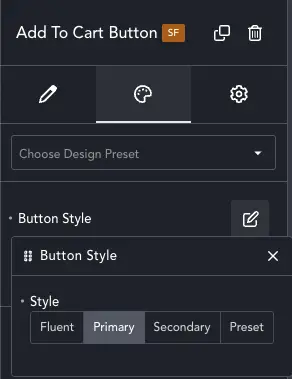
Every Fluent Button has this option. Select Fluent to keep default Fluent styles, Primary and Secondary to use the site default styles, or select a Preset. This means you can use the Breakdance Button Preset system and design your buttons there.
Don’t Cross The Streams!
Don’t try and use Global Styles AND presets. Apart from being pointless, it will also merge styles and buttons might look odd. Use one system or the other, not both.